Tuesday, June 15, 2010

Do's & Don'ts: Etiquette for Beginner Scrapbookers

1. Don't feel bad about cropping unwanted people out of photos. This is YOUR book. YOU are spending your time to make it beautiful and YOU should feel fabulous every time you open it. (Here is a purrrrfect example: Miss Bunny did not want Cleveland the Cat in the photo.)


2. Do feel okay about going back and changing a page if it doesn't bring a smile to your face when you look at it. I try to only scrapbook when the portion of my mood that's good is 51% or
greater than the percentage of my mood that's bad. (Isn't it fascinating being an emotional woman... this percentage, my friends, can change on a dime.... super fun, huh!) Anywhoooo, I try to scrapbook when I'm happy so my pages reflect that.

3. Don't misinterpret #2 to mean that all your pages have to be "happy" pages. Pages should reflect the many aspects of your life. And you may have been going through a difficult time when the photos were taken or the page was created, so that "smile" I refer to in #2 can be a smile of relief, a smile of joy, a smile to realize how far you've come... or even how far you have yet to go. (For two fabbbbbulous posts on scrapping about your "real" reality, rather than painting a picture of perfection, visit Just me My Soldier and our 2 little chicks and It's Me, KP.)

4. Do remember to bring yourself out from behind the camera. As scrappers, we are always taking pictures, trying to capture those "scrappable" moments. But I encourage you to do a few pages that are based solely on fabulous you. One of my favorite pages is "Keep Your Green Eyes on the Road". I got this page inspiration from Elizabeth Kartchner's book 52 More Scrapbooking Challenges. I wanted to remember allllllll the time I spend in rush hour traffic (see the clock hands are at 5:00?). Okay, yes folks, I did take these pictures.... while I was driving.... so unsafe, I know. But hey, they turned out pretty cool, huh?


5. Do ask for people's opinions if you hit a creativity road block. Sometimes people have better ideas than we do. Period. (Ok, maybe their ideas are better at that particular moment!)

6. Do look at other scrappers' layouts for the nuts, bolts, and inspiration. I'm not saying be a copycat. (I'm pretty sure that's frowned upon by the lawmakers in the great state of California.) However, you can learn a TON by first picking out a few photos you want to work with, finding a page or layout that you love, and using your own coordinated paper and embellishments to make it your own. No matter how much you read on this blog and other blogs for beginner scrapbookers, at the end of the day, you gotta hit the proverbial pavement and start scrapping.

7. Do NOT let scrapbooking give you headaches or anxiety. My borderline severe Type A personality sometimes spends way too much time trying to get it perfect or just right. There are no rules. There are no boundaries. And this should make you feel empowered. (Oh God, that sounded like a Celine Dion song... maybe I should wrap it up for the day.)

....Thanks to shimelle.com for the idea to do a blog post that's a list.

Beginner scrapbooking tip: For the borders on the two photos of my loooovely green eyes, I took some basic black paper and distressed it using a flathead screwdriver. Just be careful not to tear the paper, and don't use the screwdriver to stab your boyfriend for watching too much car racing.

Monday, June 14, 2010

Perfect Picture Popping - Showcasing Colorful Photos for Beginner Scrapbookers


Happy Monday! One thing I love about photographs is that they jog my memory (I don't like anything about jogging, but I do like anything that helps my memory). And one thing I love about scrapbooking is the showcasing of photographs that would otherwise sit in a box amongst thousands of others.

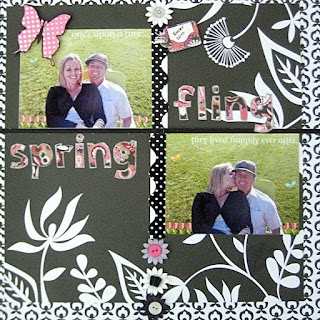
Our lesson today will be about making photos POP. Photos can do many different things, depending on what you want for that scrapbooking page. You can choose colored and/or patterned paper to actually match the photos, you can select a particular color in the photo and use similarly colored embellishments as accents, or..... drum roll, please.... you can take a vividly colored photo and make it POP even more by using black and white paper.


The photos from this page are from Easter. On Easter this year, I felt my *first* big earthquake. A bunch of people from Waters End (the name of our neighborhood, which is much like Wisteria Lane on steroids) had an Easter egg hunt in the park. As the kids were busy finding eggs, the adults congregated in a circle, enjoyed a few cocktails and reminisced about their childhoods. I felt the ground start to move, and I mean really move. I thought to myself, "These damn kids sure are heavy-footed! They're shaking the entire park!" But friends, I'm pretty quick and soon realized that there weren't really any kids in my general area. Then I thought to myself, "These damn drinks are really doing the trick! They're shaking the entire park!" Again, quick KeKe realized there's no way that could actually happen. But the ground just kept on shaking and finally someone said, "Holy cow we are having an earthquake." And my next thought after that was, "Hmmm, I sure do hope the ground opens up and swallows a certain housewife who's sitting across the circle from me." (That's a story for another day.) Alas, the ground did not open up... but I'll tell you what, the reason for my huge smile in the picture above was because I was daydreaming about that housewife falling down, down, down into a hole, never to come out (oh and because I was sitting with my handsome boyfriend).

And so... what better way to memorialize this particular day than with a page that makes those pics pop (lots of "p's" there... sorry, it's Monday). Here were my steps:

1. I edited the pics using Picnik to add the flowers, butterflies, and text directly to the photo, and to get rid of a chair that was in the background. For before and after, click here.
2. I selected a black and white pattern that had large flowers to keep with the "spring" theme, and I selected a smaller patterned black and white paper to accent (remember our lesson on large & small patterns?). I trimmed the larger pattern paper and placed it just a bit off center on top of the smaller patterned paper. Sometimes it's more interesting for things to be a little asymmetrical.
3. (Please don't focus too much on this step, as the main lesson here is making photos pop.... here, I'll make the text really tiny.) I wanted the photos to be somewhat grid-like because I already had my title in mind (more about choosing titles in a later post). I wanted the two pics and the two words to all be opposite one another in an imaginary 4-squared box.
4. The bright green of the grass against the black background has fabulous contrast -- but if you imagine it without the colorful title and pink embellishments, it might be a bit boring. I added pink flowers onto the photos and so I thought that would be a good color to use as an accent. *However* when using black and white paper, you can pretty much use any color as an accent. I'd imagine this page would've looked just as good if I had selected green accents, to match the grass.
5. For the title, I used some alphabet stencils and cut each letter out. Then I took a silver marker and outlined each letter... again, helping with the "pop" effect. Because the letters have lots of black in them, they may have blended in a bit too much with the black background without the silver outlining.

6. I also used a pre-cut pink butterfly and outlined it in black to have it "pop" away from the green in the photo (and see, I told you I had a big smile!).

7. Add a few more embellishments to top it all off. (I used paper flowers and buttons from scrapbuck.com and arranged them in a straight line to coordinate with the grid-effect of the photos and title.)


And there you have it, perfectly "popped" pictures possessing polished precision with pleasing plastic and pretty paper petals.

Beginner scrapbooking tip: As beautiful as scrapbooking pages are, sometimes the true delight that scrappers take is knowing what went on behind-the-scenes, so to speak, in the photos. This page will always remind me of that earthquake, but to many viewers, they will just see the photos and embellishments. And that's just fine with me. =)

Saturday, June 12, 2010

Making the Magic Happen - A Not-So-Significant Peek into this Beginner Scrapbooker's World

As I was stumbling through the black hole that is the blogosphere (see, I'm being productive at work!), I found shimelle.com.  Shimelle lives in London and has a huge following.  She posts about a variety of subjects... and *woohoo* has TONS of great info on scrapbooking, blogging, and even a class called "Blogging for Scrapbookers".  (The class was actually held in November, but the lessons and info are still available to download and you can work at your own pace... so check it out if it sounds like it could be helpful for you, too.)

Being a new blogger, a new scrapper, and so grateful for any assistance along the way, I signed up for the class.  My intentions for taking this class are to create the very best blog I can and to constructively help other new scrapbookers.  Oh, and because I'm addicted to scrapbooking... Yes friends, I dream, eat, sleep, everything scrapbooking.  Is it strange that during holidays or special events, I'm daydreaming about the scrapbook page I'll be able to create for that event???  Matthew thinks I'm crazy; I think Matthew is right... Bunny loves that I scrapbook because she can take loooooong naps next to me while I'm gluing and snipping away.

Also, I'm hoping to blend scrapbooking tips with funny snippets about the actual photos in the scrapbooking page.  I welcome any and all comments... whether they be about my blog, my scrapbooking pages, or if you just want to tell me that I'm awesome.

And here is where the magic happens... on the couch, with a tray on my lap, and stackable tupperware filled with embellishments spread out everywhere.  Usually Matthew is on the couch watching Formula 1 racing and Bunny is curled up and snoring.  Sometimes I'm lucky enough to have my scrapbooking buddy, Miss Hannah, on the couch next me creating beeeeeeeautiful pages of her own.  


This is my *first* scrapbook.  And honestly, I've already had to buy extra page protectors and binder extensions.  It is literally bursting at the seams... somewhat like my True Religions after a nice Mexican meal and two (okay, three) margaritas.

So readers, where does YOUR magic happen?  Where is your favorite place to scrapbook?

Friday, June 11, 2010

Flip Off!

First and foremost, THANK YOU to Gigi at kludgymom for creating Friday Flip Off... this is my first one and I must say, I can already feel the therapeutic effects.  Check out her blog to follow along!

To that muscle on my back between my shoulder blades:  Why have you been sooooo sore lately?  What did I do to deserve FOUR days of pain and interrupted sleep?  FLIP OFF!

To that guy who cut me off, then gave ME the finger (and other obscene gestures):  Really, dude?  You're a grown man.  You're disgusting.  The nerve of people who drive like idiots, then have the audacity to behave as though it was my fault!  FLIP OFF!

To the skin on my face: Where are all these zits coming from?  We are not in highschool anymore, so please, no more breakouts... FLIP OFF!

And for all you regular Kreate by KeKe readers.... here is a little scrapbooking snippet.  The absolute BEST place to buy inexpensive crafting supplies is scrapbuck.com.  I'm not endorsed by them, but I know they are awesome because I was recently at the Scrapbook Expo in San Diego and they had a huge booth... Most of their items are $1.50-$5.00.  I'M NOT KIDDING.  I gave myself a $100 budget at the expo and spent the majority of that money at the Scrapbuck booth... Just imagine all the goodies I got!!!  And they don't skimp on quality either.  Happy Friday!

Thursday, June 10, 2010

4x6, 5x7, 8x10 - For Beginner Scrappers, Size Matters!

Friends, I would argue (and I do argue, about almost everything) that the photo(s) is the most important aspect of a scrapbooking page. After all, without photos, scrapbooking probably wouldn't exist. In my very early scrapping days, I had a bunch of random 4x6 photographs. 4x6 is the standard printing size, but I quickly learned that using only 4x6 photos severely limits the creative aspect of each page. If you have a photo-printer, I suggest purchasing some photo paper that is 5x7 & 8x10. However if you are a budget-conscious scrapper, I highly suggest uploading your pictures to and printing from Snapfish. I find that Snapfish has ridiculously good printing prices and they mail the photos to you within a few days.


****Here's a warning: If you are using Picnik to edit photos (click here for an example of how beginner scrappers can edit photos), Picnik does not have the capability to pull photos from Snapfish.... super annoying. So it may take a little more leg work but it's pretty simple. Upload your pics to Picasa, use Picnik to pull Picasa photos and edit, then save them to your computer and upload them onto Snapfish. Select which photos you want to print from Snapfish, and then wait *patiently* for them to arrive. (May I suggest having photos for several upcoming scrapping pages printed at one time.... There's nothing worse than a scrapper on the loose with no photos!)


Here is an example of two pages I did where I only had 4x6 prints. You'll notice on the right side page that there's quite a bit of empty space, where a larger photo would have made the page more aesthetically pleasing. (For info on that cute ribbon border, please click here!)


So how do you choose which size photos you should order?
1. Decide which photo you want as your main focal point: this photo should be the largest. (If you are making a page with only one photo, then this step is the first and final! Easy, huh?)
2. Then choose a few photos you'd like as accents. With how inexpensive prints are, go a little crazy and print some that you might not be 100% sure you want to use. (We're not trying to "pre-plan" our layout prior to getting prints, and you'll want a good assortment.)
3. The accent photos should be smaller -- and remember from our lesson on Fiskars, you can always trim photos even further.
4. Where accent photos go and how many there should be will be discussed in a future post on layouts. (I'm hoping that I'm not putting the cart before the horse here... or does the cart go before the horse...?)


So what have we learned? Variety is key and size matters! Beginner scrapbookers will thrive on having many options from which to choose (there you go Mom, I didn't end my sentence with a prepositional phrase).


Beginner scrapbooking tip: Notice on the pages above that I used a cranberry colored paper and creme colored paper that both had a similar polka-dot pattern. Similar patterns on different color paper compliment each other well (for more beginner tips on coordinating patterned paper, click here). Also, notice that the polka-dots really make the falling snow stand out in the three adjacent pictures on the right side page.

P.S. Regarding those magenta leggings I'm sporting: no they aren't mine, no I didn't lose a bet, YES I did stop traffic. Now that's a double entendre if ever there was one.... Oooh, there's my French coming out again!

Tuesday, June 8, 2010

Fiskars are Your Friends: Snipping Tips for Beginner Scrapbooking

Ahhh Fiskars.... You make my scrapping life SO much easier.  My once crooked eye has become straight, measuring is my friend, and that sharp blade of yours takes to photos like melted butter.

Beginner scrapbooking friends: today's short-but-soooo-sweet tip is the importance of a good quality trimmer (you can pick one up at any craft store for about $15).  I've mentioned my Fiskars trimmer many times, but I thought it deserved it's own post.  That vertical clear plastic strip you see below actually lifts up (without detaching).  There's also a blade that fits perfectly in the groove of the vertical strip.  And that baby is sharp, so watch your fingers (and kids' fingers, too, if you are working on any projects from Kids Scrapping). For a perfect cut, simply slide your photo, mat, or whatever else needs a little snipping, under the vertical strip, position carefully (more on positioning below), hold the vertical strip firmly in place to prevent slipping and sliiiiiide the blade along the groove.  Voila!  Perfectly trimmed papier!  (Isn't it nice that out of three years of French, I only remember "voila" and "papier"?!)


Now, not only does the Fiskars trimmer have measurement capabilities across the top, the vertical plastic strip doubles as a secondary ruler.  You can essentially measure one piece of paper horizontally and vertically at the same time.  And if inches and centimeters allude you, there are also columns and rows to help line things up. 

Beginner scrapbooker tip: As much as I love the Fiskars, the one slight issue is that the side arm (which raises and lowers for ease of storage) doesn't lock in place once it is extended.  My suggestion is to give it a little nudge while you're getting everything lined up to make sure it is fully extended, in order to avoid "crooked-straight" lines.  Happy trimming!  Now if only trimming bangs was this easy....

Tuesday, June 1, 2010

Scrapbook Kits & Coordinating Paper

As I've mentioned, I'm a huge fan of scrapbooking kits for those of us who are just starting out. In this next layout, I nixed the idea of creating two 12 x 12 pages for each event (phew!). The kit I picked up at Michael's came with about five different patterned papers - all of which coordinated beautifully. In this page, I used four of those patterns and pieced them together in this order:


Step One: I selected the polka-dot paper for my base page.

Step Two: I selected the dark brown wood-like paper for my photo mattes. (I wanted to select a paper that matched the dark brown polka-dots in the base page, and also one which would make the outfits in the photos "pop".) I matted the photos using glue dots and my trusty Fiskars and set them aside.

Step Three: I picked the busier two toned leafy pattern and cut big blocks of it to place over the base page. (Truthfully, this is where the art of scrapping gets a little tricky. You sorta just have to play around with the blocks and the matted photos from Step Two to figure out the overall "look" of your page.)

Step Four: I picked a fourth paper, which had a larger leafy pattern and lots of empty space for journaling. (I also cut a small piece of this paper and placed it behind my vellum title. More about vellum titles later. )


Novice tip: By using "blocks" of the busier leafy pattern paper AND of the larger leafy pattern paper, I created some repetition and balance. Result? Fabulous layout, if I do say so myself!